Best WiFi Router for Small Business in 2026: What Actually Works
Best WiFi Router for Small Business in 2026: What Actually Works
The best WiFi router for small business isn’t the fastest one on the shelf it’s the one that lets you separate customer WiFi from your POS system, holds up when 20 devices are connected at once, and doesn’t require an IT degree to manage. Consumer routers from Best Buy fail this test quickly. Here’s what actually holds up in a real business environment in 2026.
For most small businesses under 2,500 sq ft, the ASUS ExpertWiFi EBR63 at $150 is the right call: business-grade features, guest portal, VLAN support, and no monthly subscription fees. Restaurants and salons with more than one room should add a second access point or step up to a TP-Link Omada setup for better coverage and centralized management.
What Makes a WiFi Router Actually Good for Small Business
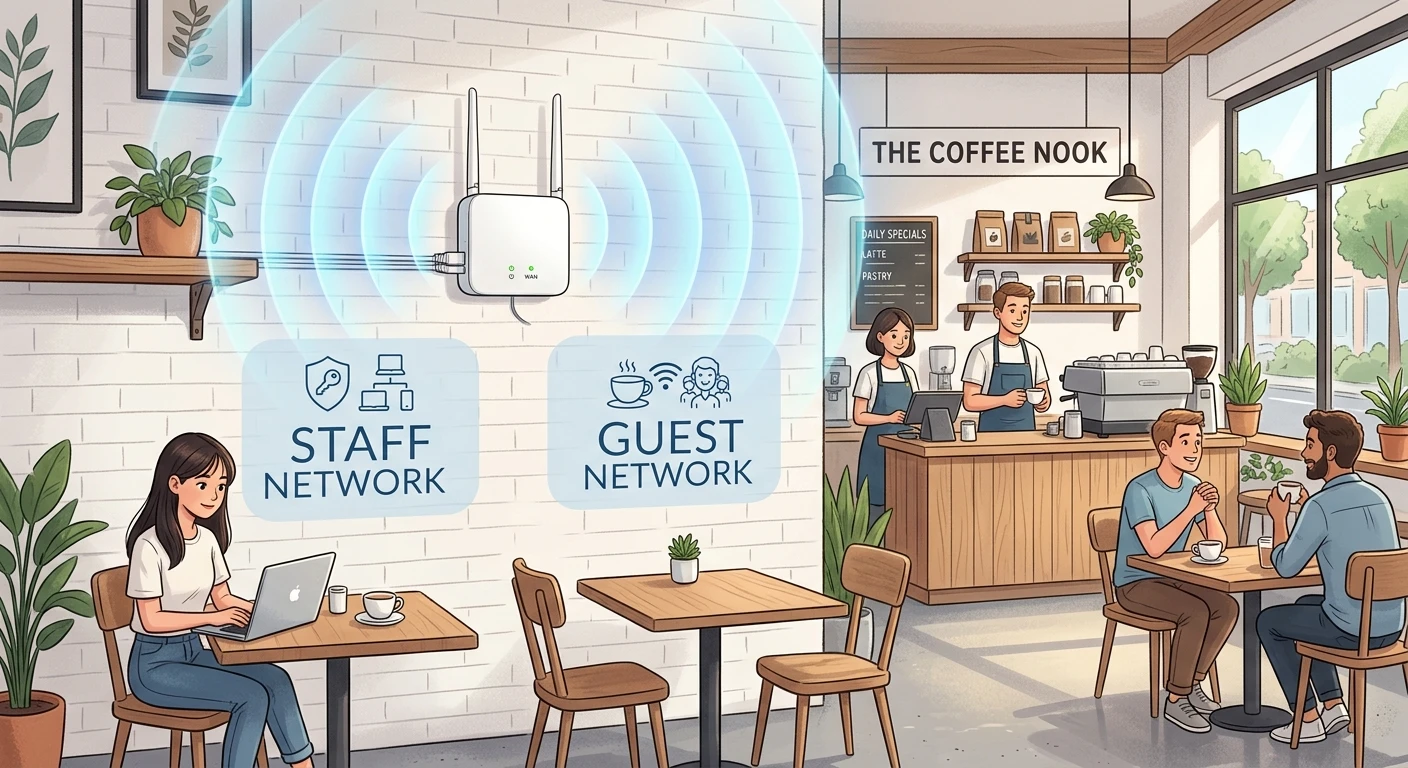
A business router needs to do things a home router doesn’t. Your customer WiFi should never touch the same network as your point-of-sale terminal or your back-office computer. You need a guest portal a branded login page customers see when they connect. You need to be able to block social media during work hours for staff. And when something breaks at 8pm on a Friday, you need to fix it from your phone without driving in.
Consumer routers from Netgear, Eero, or TP-Link’s home line don’t include these features out of the box. The models below do.
VLAN stands for Virtual Local Area Network. It lets you split one physical router into separate isolated networks one for staff, one for customers, one for your POS terminals so a breach on the guest WiFi can’t reach your payment systems.
A branded login page customers see before accessing your WiFi. You can add your logo, require an email, or set a time limit. It’s standard on business-grade hardware and completely absent on most consumer routers.
A mobile app or cloud dashboard that lets you reboot the router, check which devices are connected, and block users all from your phone, without being on-site.
WiFi 6 is the current standard. It handles many devices connecting at the same time far better than the older WiFi 5 standard. In a busy restaurant or salon with 30+ connected devices, the difference is real.
Best WiFi Router for Small Business: Top Picks for 2026
1. ASUS ExpertWiFi EBR63 Best Overall for Most Small Businesses
The EBR63 is purpose-built for small businesses: coffee shops, salons, small offices, and retail stores. It runs WiFi 6 with speeds up to 3,000 Mbps, supports up to 100 connected devices, and includes five separate SSIDs meaning you can run employee, guest, IoT, POS, and management networks all from one $150 device. ASUS includes AiProtection Pro security at no extra charge, which blocks malicious websites and monitors traffic across all connected devices.
The standout feature is the Self-Defined Network system. You pick a scenario (office, coffee shop, home office), and the router pre-configures the right network layout automatically. The mobile app handles remote management cleanly. And unlike Netgear Orbi or Eero, there is no subscription required to unlock the full feature set everything works out of the box, for life.
The one honest limitation: all ports are Gigabit only, not multi-gig. If your ISP delivers speeds over 1 Gbps, the EBR63 will bottleneck your wired connection. For most small businesses paying for a 200 to 500 Mbps plan, this is a non-issue.
2. TP-Link Omada EAP670 Best for Larger Spaces or Multi-Room Coverage
The Omada EAP670 is a ceiling-mount access point (AP), not a standalone router. You pair it with a TP-Link router and manage everything through the free Omada cloud portal or app. This setup makes more sense when your space is over 2,500 sq ft, when you have multiple rooms or floors, or when you eventually want to add more APs without replacing hardware.
The EAP670 uses WiFi 6 with a 2.5 Gbps port, supports up to 250 concurrent devices per AP, and includes a 5-year warranty. At $150 per unit, you can cover an entire restaurant or salon with two APs and a $35 TP-Link router for under $340 total and add more APs later as you grow.
The setup is slightly more involved than plug-and-play. You need to mount the AP on the ceiling or wall, run an Ethernet cable to it, and configure it through the Omada app. For most business owners without IT experience, this is a job for an installer or a tech-savvy employee the first time.
3. Netgear Orbi Pro WiFi 6 (SXR80) Best for Mesh Coverage Without Cabling
If running Ethernet cables isn’t an option say, you’re in a rented space with no cable access the Netgear Orbi Pro gives you mesh WiFi without wires. The satellite unit connects wirelessly to the main router and extends coverage to a second room or floor. It supports four separate networks and covers up to 5,000 sq ft with the two-unit kit.
The drawback is price: the Orbi Pro SXR80 two-pack runs around $400, nearly three times the cost of the ASUS EBR63. And Netgear’s Insight cloud management costs extra after the trial period. For businesses that genuinely can’t run cable, it’s worth it. For everyone else, the ASUS or Omada setups are a better investment.
| Router | Price | WiFi Standard | Max Devices | Subscription | Best For |
|---|---|---|---|---|---|
| ASUS ExpertWiFi EBR63 Best Overall | $150 | WiFi 6 | 100 | None | Shops under 2,500 sq ft |
| TP-Link Omada EAP670 | $150/AP | WiFi 6 | 250/AP | None | Multi-room or growing spaces |
| Netgear Orbi Pro SXR80 | ~$400 (2-pack) | WiFi 6 | 60/unit | Optional ($) | No-cable mesh coverage |
How to Set Up a Business WiFi Router the Right Way
📋 Setting Up the ASUS ExpertWiFi EBR63
Download the ExpertWiFi app on your phone. Plug the router into your modem using the WAN port (labeled with an arrow or globe icon). Power it on and wait 60 seconds for it to boot.
Open the app and tap Set Up Network. Select your scenario (Coffee Shop, Office, or Home Office). The router will pre-configure the correct network layout for your business type.
Create your staff network: in the app, go to Networks → Add Network → Employee. Set a strong password. This is the network your POS, computers, and printers connect to.
Create your guest network: go to Networks → Add Network → Guest Portal. Add your business name and logo. Set a time limit if you want (e.g., 2 hours). This is the network you post on your WiFi sign.
Enable content filtering for staff: go to Security → Web Filter and block Social Media and Streaming categories during business hours. Takes 30 seconds and keeps employees focused.
Place your router at least 6 feet off the ground and away from metal shelving, microwaves, and thick concrete walls. In the ExpertWiFi app, go to Network Map → Signal Strength to see a live heatmap of your coverage before finalizing placement. Moving the router 3 feet in the right direction can eliminate a dead zone without buying extra hardware.
A nail salon in Coral Gables called me after their card reader kept dropping mid-transaction on busy Saturdays. They had a consumer-grade Eero router with every device on the same network their Square terminal was competing for bandwidth with 15 customer phones streaming Instagram. I swapped it for an ASUS EBR63, put the Square terminal on a dedicated VLAN, and set the guest network to throttle at 5 Mbps per device. Transactions stopped dropping that same afternoon. Total hardware cost: $150.
: Carlos Mendoza, Network Engineer · Miami, FL✓ What Works
- Business routers under $200 now include features that cost $500+ five years ago
- ASUS and TP-Link Omada have no mandatory subscription fees you pay once and own it
- WiFi 6 handles 20 to 30 devices simultaneously without the slowdowns older routers showed
- Remote app management means you can reboot and diagnose from anywhere
- Separate guest and staff networks protect your POS and business data from customers
✗ What to Watch
- Consumer routers (Eero, standard TP-Link, Google Nest) don’t support VLANs avoid them for business use
- Netgear charges a monthly fee for full Insight cloud management after the trial ends
- One router rarely covers a space over 2,500 sq ft reliably multi-room setups need access points
- WiFi 7 hardware is available but costs 2 to 3 times more overkill for most small businesses in 2026
- WiFi 6, up to 3,000 Mbps
- 100 devices max
- 5 SSIDs, guest portal
- VLAN, VPN, AiProtection Pro
- ExpertWiFi app (free)
- WiFi 6, up to 5,400 Mbps
- 250 devices per AP
- Ceiling or wall mount
- Free Omada cloud management
- 5-year warranty
- WiFi 6 mesh, no wiring needed
- Up to 5,000 sq ft coverage
- 4 separate networks
- Best for rental spaces
- Easy setup, higher cost
Who Should Buy Which Router
The best WiFi router for small business in 2026 is the one that keeps your customer network away from your payment systems, stays online without babysitting, and costs under $200. The ASUS ExpertWiFi EBR63 checks all three boxes for most shops. If you need coverage across multiple rooms, pair it with a TP-Link Omada access point. Either way, stop running your business on a router designed for a living room.
Upgrade Your Business Network Today
The ASUS ExpertWiFi EBR63 is $150 on Amazon with no subscription fees, no monthly charges, and free commercial-grade security built in.
Get the ASUS EBR63 on Amazon →