Ring Alarm 14-Piece Kit Review: Best Security System for Small Business (2026)
Ring Alarm 14-Piece Kit: Is It the Best Security System for a Small Business?
A hands-on look at whether this consumer-grade system can hold up in a salon, retail shop, or small office — from someone who has wired dozens of them in South Florida.
If you’ve Googled “best security system for small business” at 11 p.m. after your alarm company quoted you $80 a month, the Ring Alarm 14-Piece Kit (2nd Gen) is probably already in your cart. The question is whether a system built for a 3-bedroom house can actually do the job in a salon, retail shop, or small office. After setting up security systems and networks in restaurants, nail salons, and retail stores across Miami for the past decade, here is my honest answer.
- Salon, barbershop, or spa owner with one location under 2,000 sq. ft.
- Retail shop or boutique without a loading dock or back warehouse
- Small office (4–10 people) that needs basic intrusion detection
- Restaurant owner who wants door/window alerts after hours
What You Actually Get in the Ring Alarm 14-Piece Kit
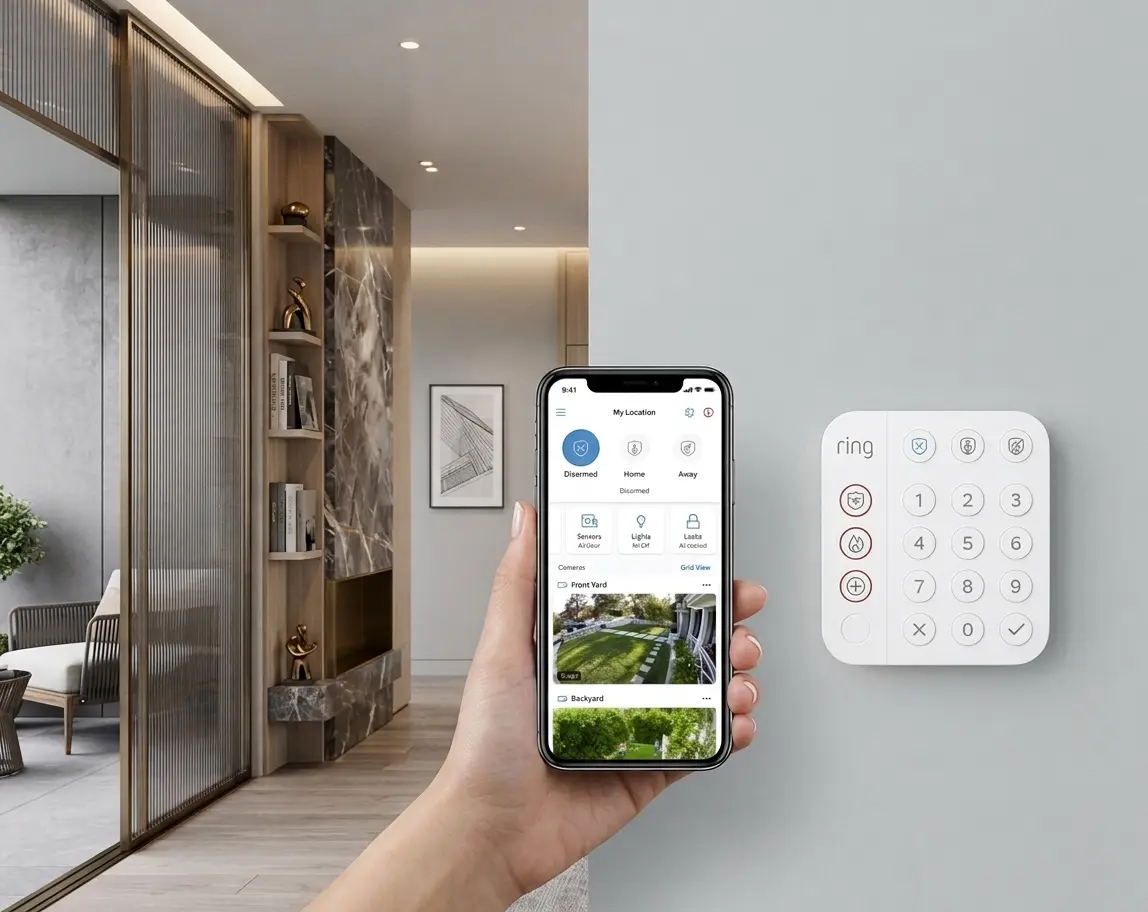
The 14-piece kit ships with one Base Station (the brain of the system), two Keypads for arming and disarming at two entry points, eight Contact Sensors — the small two-part sensors that stick on doors and windows and trigger an alert when separated — two Motion Detectors for hallways or back rooms, and one Range Extender that keeps the wireless signal strong across your space.
Base Station
Central hub with built-in siren, backup battery, and cellular backup option.
8 Contact Sensors
Door and window sensors. Alert you instantly when any entry point opens.
2 Motion Detectors
PIR (passive infrared) sensors — they detect body heat as someone moves through a room.
2 Keypads
Arm/disarm at the front door and a secondary entry point like a back office.
Eight contact sensors cover a lot of ground for a small commercial space. A typical salon has one front door, a back door, maybe four windows facing the street, a supply closet, and a break room door. That is seven sensors right there — and you still have one left over.
How to Set Up the Ring Alarm System Step by Step
Ring is designed for self-installation. No technician required. Here is the exact path:
Setup Path
Base Station → Ethernet cable → Modem/Router
Ring App → Set Up Device → Security Devices → [Device Type]
Ring App → Alarm → Modes → Away / Home / Disarmed
Ring App → Account → Shared Users → Add User
I set up a version of this system for a nail salon on Coral Way last year. The owner’s main concern was not theft — it was catching employees leaving through the back door after hours on days she was not there. We placed contact sensors on the front door, back door, and two supply closets. She gets a phone alert every single time any door opens after 7 p.m. Two weeks in, she flagged a pattern she had not noticed before. The system paid for itself in the first month.
The Subscription Cost: What You Need and What You Don’t
The Ring Alarm hardware works out of the box without a subscription — the siren sounds and the Base Station stores recent events locally. But most of what makes it useful for a business requires a paid Ring Protect Plan (Ring’s subscription service). Here is what you actually need versus what is optional:
| Feature | No Subscription | Ring Home Basic ($10/mo) | Ring Home Standard ($20/mo) |
|---|---|---|---|
| Siren sounds on trigger | ✓ Yes | ✓ Yes | ✓ Yes |
| Mobile alerts to your phone | ✗ No | ✓ Yes | ✓ Yes |
| Remote arm/disarm via app | ✗ No | ✓ Yes | ✓ Yes |
| 24/7 Professional Monitoring | ✗ No | ✗ No | ✓ Add-on |
| Cellular backup if internet drops | ✗ No | ✗ No | ✓ Yes |
| Video history (if you add cameras) | ✗ No | ✓ 180 days | ✓ 180 days |
For most small business owners, the Ring Home Basic plan at $10/month is the minimum that makes this system worth having. Without it, you get a loud siren but no phone notification — and you won’t know something happened until you show up the next morning. Note: Ring updates plan names occasionally; confirm current pricing at ring.com before you buy.
Honest Pros and Cons for a Small Business
What Works
- No technician install — one afternoon, done
- Eight sensors cover most small commercial spaces
- Cellular backup keeps you covered if someone cuts your internet line
- Shared user access for staff without giving full control
- Expandable — add cameras, glass break sensors, flood sensors later
- 24-hour backup battery handles power outages
- Loud 104dB siren on the Base Station
What Doesn’t
- No video without adding separate Ring cameras
- Subscription required for phone alerts — the most important feature
- Not UL-listed for commercial insurance discounts in most states
- 1,500 sq. ft. Wi-Fi coverage — too small for a mid-size restaurant
- All sensors run on batteries — need periodic replacement
- No integration with commercial POS or access control systems
Ring Alarm vs. The Alternatives
| System | Hardware Cost | Monthly Fee | Professional Install | UL Listed |
|---|---|---|---|---|
| Ring Alarm 14-Piece | ~$250 | $10–$20 | No (DIY) | No |
| SimpliSafe Business | $300–$500 | $30–$50 | No (DIY) | Yes |
| ADT Small Business | $0–$200 | $60–$100 | Yes | Yes |
| Verkada (enterprise) | $1,000+ | $200+ | Yes | Yes |
If your only goal is to get an alert when a door opens after hours, Ring Alarm is the most affordable way to do that. If you need professional monitoring for insurance purposes or your business handles high-value inventory, SimpliSafe Business is the next step up without the ADT contract lock-in.
Is the Ring Alarm 14-Piece the Best Security System for a Small Business?
For a salon, boutique, or small office under 2,000 square feet with a $250 hardware budget and no interest in a long-term monitoring contract, yes — the Ring Alarm 14-Piece Kit is the best security system for a small business at this price point. It is not a commercial-grade system. It will not satisfy an insurer looking for a UL Listed device. But it will tell you when your back door opens at 11 p.m., and it will cost you less per month than a single lunch for your staff.
The 14-piece kit specifically is the sweet spot: the 8-piece does not give you enough sensors for a space with multiple entry points, and jumping to a commercial system triples your cost. If your space is bigger than 2,000 square feet, add an eero 6 Extender and a second Ring Alarm Range Extender — both available separately — before assuming the system won’t reach.
Ready to Secure Your Small Business?
The Ring Alarm 14-Piece Kit is available on Amazon with free shipping. Add the $10/month Ring Home Basic plan and you’ll have phone alerts, remote arming, and 180-day video history if you pair a Ring camera later.
View on Amazon